Yes, I have an app on my phone called Adobe Draw. I take a picture with my phone of one of my sketches. Then in the app, I create an “image layer” and select a photo from my phone. I then create another layer on top of the photo I’ve imported and “trace” a drawing from there. I then turn off the image layer so I can’t see it and start working with the new drawing until I like it. At that point it was just one single graphic element of the hellebore and stem and foliage. Then it’s a matter of duplicating the that first layer and using the “transform” tool to move the copy around to an orientation in relation to the first one. In this case I simply lined it up above the first one. Then began a series of doing what is called “merging down” to the next layer where I can combine the two layers into one layer, which I then duplicate again. Once I had a vertical stack of blooms and had merged them down to be one layer, I duplicated it again and this time, in transform mode, I flipped the layer vertically and horizontally and arranged it so it fit with the first column. After that I kept doing “merge down” and duplicate until I filled the page, which gave me an idea of what an over all repeat would look like.
The Adobe Draw app is part of a suite of applications that I pay for on a monthly basis through Adobe Creative Cloud, which gives me access to everything from Illustrator to Photoshop to InDesign. It’s expensive at $50 a month. Draw is a “vector” based drawing application, which means that once an element is created it can be scaled up or down infinitely without losing its resolution, which is valuable if you plan to print or reproduce these drawings in the future. There are probably other vector apps that you can find for cheaper. Also, “raster” apps, will let you draw in once scale and create an image, but if you enlarge them they will start to break up and look jagged because they are not created with the correct math to be able to be reproduced at any scale without distortion.
I started using Draw years ago before it was part of Adobe Creative Cloud and I doubt I would continue to pay for it monthly if I didn’t have delusions of grandeur about someday getting textiles printed. To be truly ready to do that, I’d have to learn how to manipulate the graphic elements in Illustrator, which is not an easy application to use. I’ve been meaning to learn how for ages, but I have created hundreds of Draw files, everything from patterns to doodles, over the years. I know the application pretty well by now, which is another reason why I’m paying for the Adobe subscription fee. I don’t want to relearn a new application!

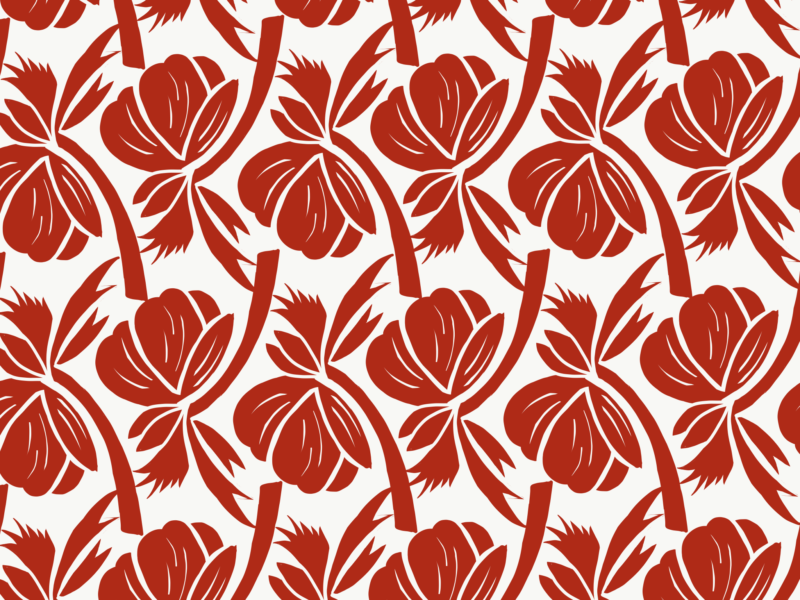
Stunning! Red and white is always very sharp! Love this!
This one is fantastic. Could you explain how you are producing the final pattern?
Yes, I have an app on my phone called Adobe Draw. I take a picture with my phone of one of my sketches. Then in the app, I create an “image layer” and select a photo from my phone. I then create another layer on top of the photo I’ve imported and “trace” a drawing from there. I then turn off the image layer so I can’t see it and start working with the new drawing until I like it. At that point it was just one single graphic element of the hellebore and stem and foliage. Then it’s a matter of duplicating the that first layer and using the “transform” tool to move the copy around to an orientation in relation to the first one. In this case I simply lined it up above the first one. Then began a series of doing what is called “merging down” to the next layer where I can combine the two layers into one layer, which I then duplicate again. Once I had a vertical stack of blooms and had merged them down to be one layer, I duplicated it again and this time, in transform mode, I flipped the layer vertically and horizontally and arranged it so it fit with the first column. After that I kept doing “merge down” and duplicate until I filled the page, which gave me an idea of what an over all repeat would look like.
The Adobe Draw app is part of a suite of applications that I pay for on a monthly basis through Adobe Creative Cloud, which gives me access to everything from Illustrator to Photoshop to InDesign. It’s expensive at $50 a month. Draw is a “vector” based drawing application, which means that once an element is created it can be scaled up or down infinitely without losing its resolution, which is valuable if you plan to print or reproduce these drawings in the future. There are probably other vector apps that you can find for cheaper. Also, “raster” apps, will let you draw in once scale and create an image, but if you enlarge them they will start to break up and look jagged because they are not created with the correct math to be able to be reproduced at any scale without distortion.
I started using Draw years ago before it was part of Adobe Creative Cloud and I doubt I would continue to pay for it monthly if I didn’t have delusions of grandeur about someday getting textiles printed. To be truly ready to do that, I’d have to learn how to manipulate the graphic elements in Illustrator, which is not an easy application to use. I’ve been meaning to learn how for ages, but I have created hundreds of Draw files, everything from patterns to doodles, over the years. I know the application pretty well by now, which is another reason why I’m paying for the Adobe subscription fee. I don’t want to relearn a new application!
Do you use the patterns you make? Like, for example in wrapping paper or fabric?